
Manual Journal
Use a manual journal to record an accounting adjustment directly in your ledger. Each line identifies an account and the amount to debit or credit. For day-to-day sales and purchases, use the dedicated transaction screens so the related documents are recorded together.
Find journals and drafts
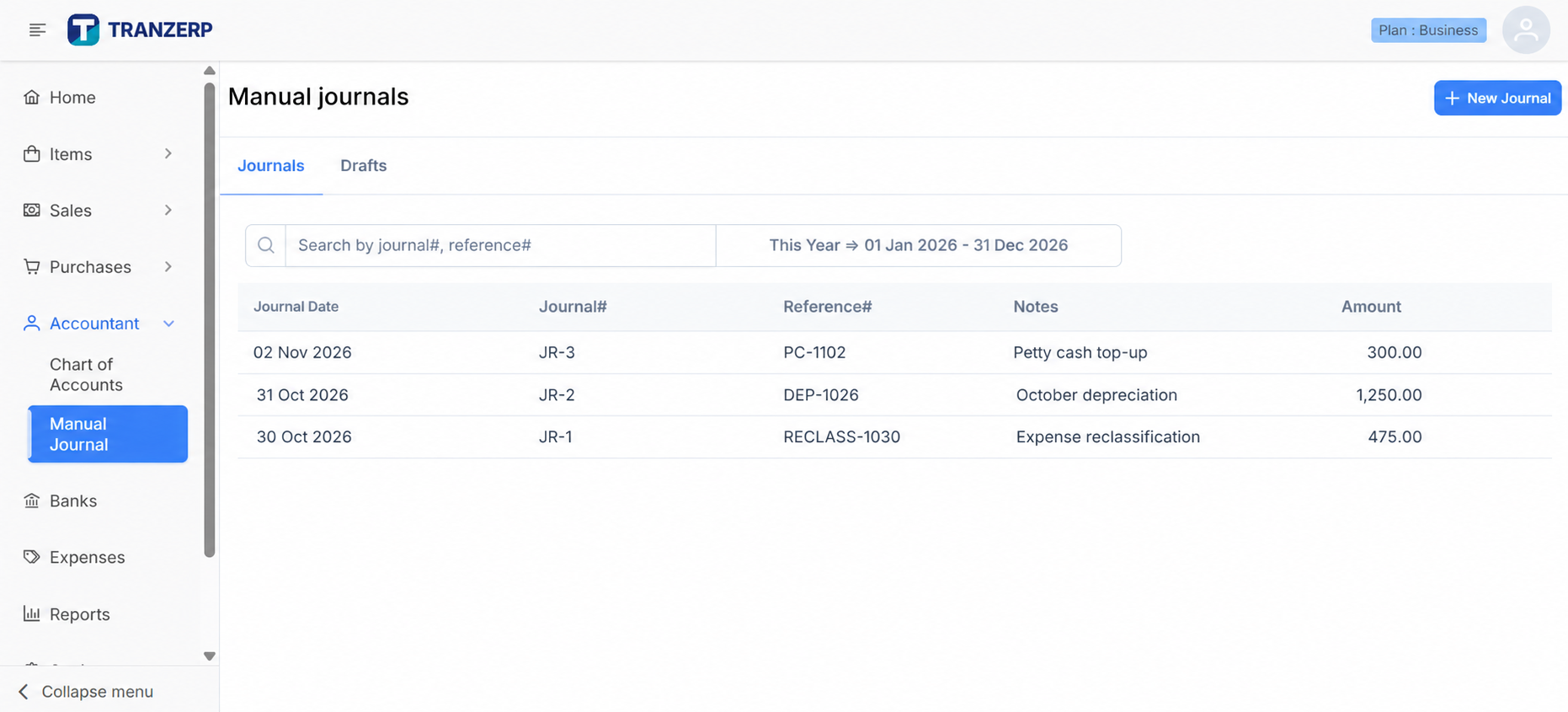
- In TranzERP, expand Accountant and choose Manual Journal.
- Use Journals for completed entries or Drafts for entries saved for later.
- Search by journal or reference number. Check that the date filter includes the journal date. The list shows the journal date, number, reference, notes and amount.
Start a new journal
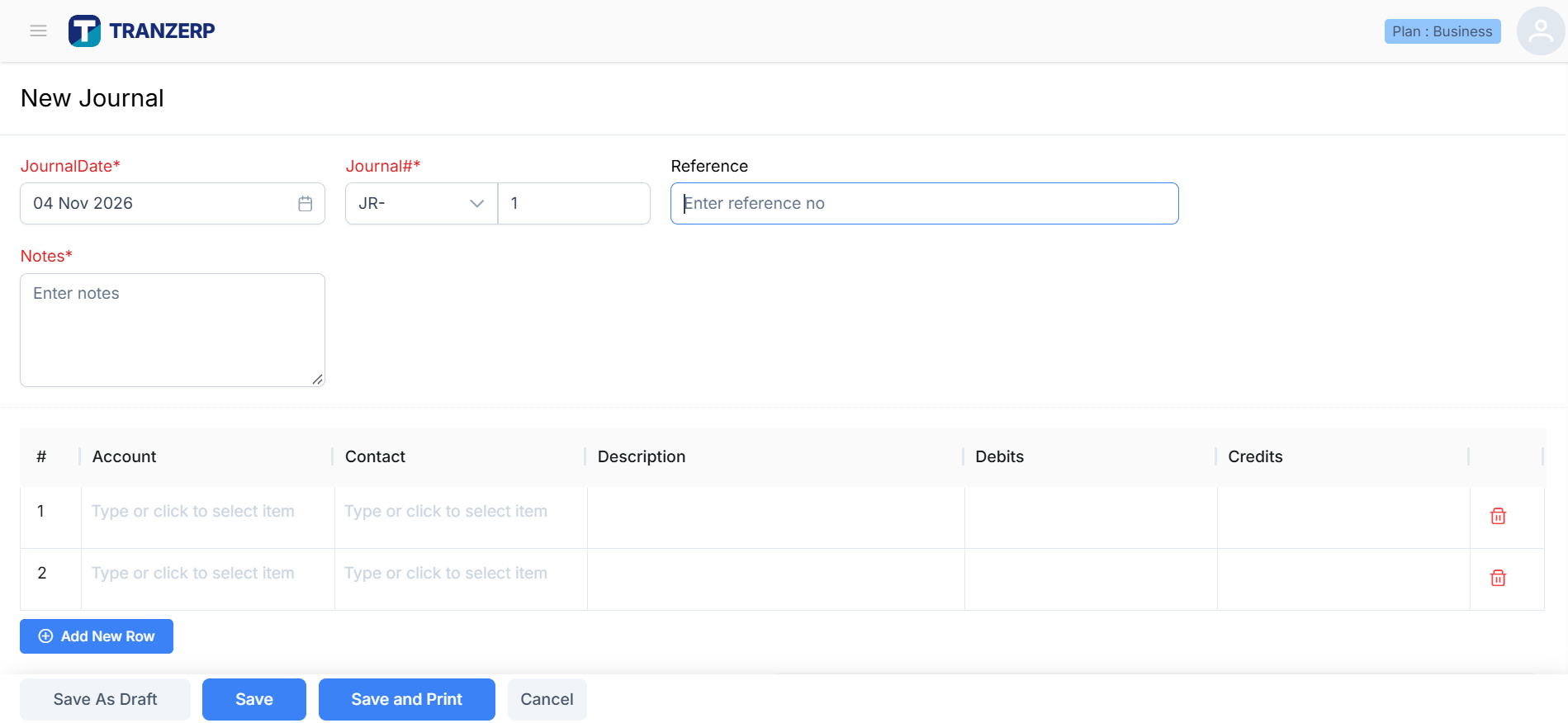
Click New Journal and complete the details at the top of the form.
- Journal Date
- Required. Select the accounting date for the entry.
- Journal#
- Required. Check the prefix and number shown, such as JR-1.
- Reference
- Optional. Enter a supporting document number or an internal reference you can search for later.
- Notes
- Required. Summarize why you are making the entry so someone else can understand it later.
Enter journal lines
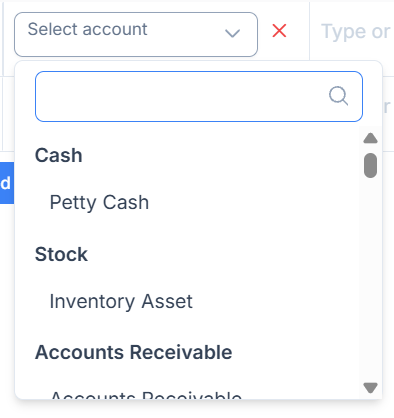
- Choose an Account for each line. The dropdown has a search box and groups accounts by type. Review the account name and group before selecting it.
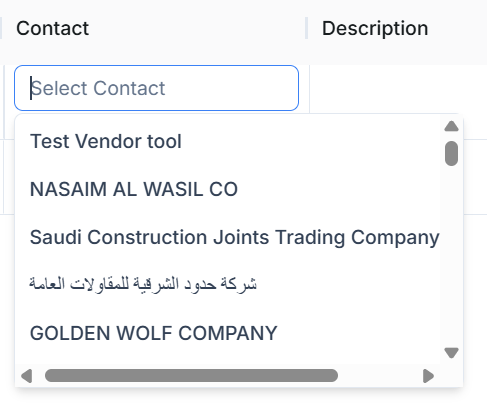
- Use Contact when a line needs to refer to a contact. Select the relevant record if it is available. The example shows vendor contacts, and the available records depend on your workspace.
- Use Description for line-specific detail. Enter the amount in either Debits or Credits for that line.
- Click Add New Row for another line. Use the trash icon to remove a line from the form.
Account dropdown options
The supplied options are grouped below by account type. Account names and availability depend on the records configured in your workspace. See the Chart of Accounts guide.
| Account type | Accounts |
|---|---|
| Cash | Petty Cash |
| Stock | Inventory Asset |
| Accounts Receivable | Accounts Receivable |
| Other Current Asset | Prepaid Expenses, Input VAT, Retention Receivable |
| Accounts Payable | Accounts Payable |
| Other Current Liability | Unearned Revenue, Output VAT, Opening Balance Adjustments, VAT Payable, Retention Payable |
| Equity | Retained Earnings |
| Income | Sales, Sales Discount, General Income |
| Expense | Purchase Discount, Office Supplies, Advertising and Marketing, Bank Fees and Charges, Credit Card Charges, Lodging Expense, Travel Expense, Telephone Expense, Automobile Expense, IT and Internet Expenses, Rent Expense, Janitorial Expense, Postage Expense, Printing and Stationary, Employee Salaries and Wages, Meals and Entertainment, Repairs and Maintenance, Miscellaneous, Consultant Expense, Depreciation Expense, Other Expenses, FUEL EXPENS, COMISSION, DONATION, KURI, TRANSPORT, PURCHASE |
| Cost Of Goods Sold | Cost Of Goods Sold |
| Bank | Alinma Bank |
Check that debits and credits balance
Debits and credits are the two sides of a journal. Scroll below the journal lines to check the balance summary. Double-entry bookkeeping reference
- Total (SAR)
- Shows the sum of the debit entries and the sum of the credit entries separately, in Saudi riyals.
- Difference
- Shows whether the debit and credit totals are out of balance. If the totals differ, review the amounts and check for missing lines or entries in the wrong column before saving the completed journal.
For example, suppose SAR 300 was moved from the operating bank account into petty cash. Both accounts hold business funds. Petty cash increases, and the bank balance decreases.
| Account | Debits (SAR) | Credits (SAR) |
|---|---|---|
| Petty Cash | 300.00 | — |
| Bank account | — | 300.00 |
| Total | 300.00 | 300.00 |
In this example, Total (SAR) shows SAR 300.00 on each side and Difference shows SAR 0.00 on both sides. Check that each line uses the intended account and column before saving.
Check whether the transfer was already recorded through your bank workflow before entering it as a manual journal.
Save a draft, save or print
- Save As Draft
- Keep the entry for later review. Look for it under Drafts.
- Save
- Record the completed journal after checking its date, accounts and amounts. Look for it under Journals.
- Save and Print
- Save the completed journal and open the print workflow.
- Cancel
- Leave the form without saving the changes.
Troubleshooting
The entry does not balance.
Compare the debit and credit totals. Look for missing lines, mistyped amounts or amounts entered in the wrong column.
The account or contact is missing.
Check the account in Chart of Accounts or look up the contact in its record list. Return to the journal and check the available choices.
A saved journal is hard to find.
Check both tabs, clear the search, and widen the date filter to include the entry.
The Difference is zero, but I am unsure the entry is correct.
Check the selected accounts, the debit or credit side of each line, the amounts and the journal date against the supporting records. Equal totals are one check. The individual lines also need to represent the intended transaction.
I cannot save the journal.
Check Journal Date, Journal# and Notes, then review the line accounts and amounts. Compare the debit and credit totals and follow any validation message shown by the form.
How do I explain what each line is for?
Use Notes for the reason for the whole journal and Description for the detail of an individual line. Add a Reference to connect the entry with its supporting document.